




The Dangers of Unsecured Public Wi-Fi: How V2Nodes Protects You.
Don’t fall victim to public wifi dangers. I share the must-know risks and how V2Nodes keeps you safe.
I’ve used many “free” networks in coffee shops, airports, and hotels. That easy login screen seems like a blessing when you need to check email or finish work. But, this convenience comes with a hidden cost—your personal privacy.
These open networks are often not secure at all. When you connect, you’re sharing your digital life with others on the network. Your login details, financial info, and private messages can be caught by bad actors.
That’s why I trust V2Nodes. It makes a secure, encrypted path for all my online activities. Whether I’m browsing or banking, my data stays safe from unwanted eyes. It turns risky public connections into private, safe paths.
Key Takeaways
- Free public Wi-Fi networks often lack basic security protections
- Your sensitive personal data can be easily intercepted on unsecured connections
- Cybercriminals frequently target these networks to steal information
- Simple browsing on public networks exposes more data than most people realize
- Encryption services like V2Nodes create a protective barrier for your online activity
- Protecting your digital privacy requires proactive security measures
- Secure connections are essential for both work and personal internet use
Why “Free Wi-Fi” Could Cost You Everything
We see the sign for free internet and connect without a second thought. It feels like a small victory, a modern convenience we’ve come to expect. Yet, this automatic habit hides a dangerous contradiction. The very thing that promises connection and convenience can become a gateway for theft and intrusion. Understanding this paradox is the first step in guarding against the very real risks of using public wifi.
The Allure and Danger of Public Hotspots
Public Wi-Fi networks are everywhere—from coffee shops and airports to hotels and libraries. Their appeal is obvious: instant, cost-free access in a world that runs on data. We’re driven by urgency and convenience, often prioritizing getting online over considering how secure that connection might be.
Why We Take Unnecessary Risks
Our brains are wired to seek reward and avoid immediate inconvenience. When you’re in a hurry to send an email or check a map, the future threat of cybercrime feels abstract. The present benefit of free access feels concrete. This cognitive bias leads us to click “connect” on networks named “Free Airport WiFi” or “Coffee_Shop_Guest,” ignoring the glaring red flags.
We also operate under a false sense of security. Many believe that if a place is reputable, its Wi-Fi must be safe. Or we think that simply having a password on the network (like in a hotel) means our data is protected. These assumptions are tragically incorrect and form the bedrock of our vulnerability.

That free connection isn’t free. The price is your privacy and security. When you use an unsecured public hotspot, you may be paying with:
- Your Financial Data: Credit card numbers, bank login details, and payment app info can be intercepted.
- Your Personal Identity: Login credentials for email, social media, and cloud accounts are up for grabs.
- Your Professional Information: Sensitive work emails, confidential documents, and corporate network access can be compromised.
- Your Digital Footprint: Every website you visit, every search you make, can be monitored and logged by a malicious actor on the same network.
The real cost isn’t just stolen data; it’s the aftermath—spending months repairing your credit, recovering hijacked accounts, and dealing with the stress of a data breach. This is the hidden bill presented by “free” internet.
My Personal Wake-Up Call
I learned this lesson not from a textbook, but from a heart-stopping moment of my own. It transformed my understanding of digital security from a theoretical concern into a personal mandate.
A Personal Story of Data Vulnerability
A few years ago, I was working remotely from a well-known hotel lounge. I connected to the official “Hotel_Guest” network, entered the provided password, and thought I was secure. I spent an hour reviewing financial statements and sending emails with sensitive attachments.
Later that day, I received a fraud alert from my bank for a small, unfamiliar online purchase. It was a test. The criminals had gotten my card details from that session. I immediately realized the hotel’s Wi-Fi, while password-protected for access, did not encrypt the data traveling across it. My information was broadcast in plain text for anyone on that network to scoop up. I was lucky the bank caught it early, but the violation I felt was profound.
What I Learned From My Own Close Call
That incident was my ultimate wake-up call. It taught me three critical lessons that define my approach to cybersecurity today:
- A Password is Not a Shield: A network login password only controls who can join the network. It does nothing to scramble or protect the data you send once you’re connected.
- Complacency is the Greatest Risk: I was in a “trusted” environment and doing “normal” work. Hackers prey on this exact sense of normalcy and trust.
- Proactive Protection is Non-Negotiable: Relying on the security of a public network is a gamble. True safety requires you to bring your own security with you, creating a private tunnel for your data no matter where you are.
This personal brush with the risks of using public wifi shifted my mindset completely. It moved me from hoping for safety to actively engineering it for every connection I make.
The Hidden Dangers of Public Wifi Dangers: What You Don’t See Can Hurt You
Understanding the dangers of public hotspots is key to staying safe on public wifi. The threats aren’t always obvious. They are often silent, automated processes that happen in the background. I’ll explain three common and dangerous attacks. Knowing how they work makes you safer.
Man-in-the-Middle Attacks: The Invisible Threat
Imagine a private conversation where a stranger secretly listens and alters what you say. A Man-in-the-Middle (MitM) attack is like this. The hacker positions themselves between your device and the internet.
How Hackers Intercept Your Data in Real-Time
When you connect to a compromised router, the attacker can redirect your traffic. Every website request, login attempt, and message you send passes through their hands. They see everything before it reaches its intended destination.
They use tools to decrypt weak security or exploit software flaws. Your data is captured, analyzed, and sometimes even modified. An attacker could change a bank transfer amount or the recipient’s details before the information reaches the bank’s server.
Real Examples of Data Interception
I’ve read reports of hackers in crowded coffee shops using cheap, portable devices to launch these attacks. In one case, they intercepted login credentials for a corporate email account. In another, they captured credit card details during an online purchase. The users had no idea their session was compromised until it was too late.
Public spaces with many connected users are prime targets. The hacker’s goal is often credential harvesting or financial theft. They rely on the fact that most people assume a public network is just slow, not hostile.
Evil Twin Networks: When Free Wi-Fi Isn’t What It Seems
This attack preys on trust and convenience. A hacker sets up a rogue Wi-Fi hotspot with a name that looks legitimate. It might be called “Free Airport WiFi” instead of the official “Airport_Partner_WiFi,” or “Starbucks_Guest” right next to a real Starbucks.
How to Spot Malicious Hotspots
Vigilance is your best defense. First, always verify the official network name with staff at the location. If you see two very similar names, that’s a major red flag. Second, be wary of networks that require no password at all when others do.
Third, if you connect and immediately get prompts to “update software” or enter personal details to access the internet, disconnect immediately. Legitimate public networks rarely ask for such information upfront. This practice is fundamental to staying safe on public wifi.
The Airport and Hotel Wi-Fi Trap
These are high-risk zones. Travelers are tired, in a hurry, and desperate to connect. Hackers know this. They set up powerful portable routers that broadcast strong signals with names like “Airport_Free_WiFi” or “Hotel_Guest.”
Once connected, all your internet traffic flows through the hacker’s device. They can steal booking confirmations, frequent flyer logins, and even passport details if you fill out a form. I always double-check the exact network spelling provided at the hotel front desk or on airport signage.
Packet Sniffing: Your Data Laid Bare
Data travels across networks in small chunks called “packets.” On a secure, encrypted connection, these packets are scrambled. On an open public Wi-Fi network, they can be sent in plain, readable text. Packet sniffing is simply using software to collect and read these unencrypted packets.
What Information Hackers Can Steal
The range of data vulnerable to sniffing is alarming. It goes far beyond just website addresses. The table below breaks down the common types of information exposed:
| Data Type | Specific Examples | Potential Consequence |
|---|---|---|
| Login Credentials | Usernames & passwords for email, social media, banking sites (if not using HTTPS fully). | Account takeover, identity theft, financial loss. |
| Personal Messages | Contents of emails, instant messages, and social media DMs sent in plain text. | Privacy invasion, blackmail, corporate espionage. |
| Browsing History | Every URL of every website and page you visit. | Profiling of habits, interests, and potential vulnerabilities. |
| Session Cookies | Digital keys that keep you logged into websites like Amazon or Facebook. | Session hijacking, where a hacker can access your accounts without your password. |
| Financial Information | Credit card numbers, CVV codes, and billing addresses entered on non-secure forms. | Direct financial fraud and unauthorized purchases. |
Tools That Make This Scarily Easy for Attackers
You don’t need to be a coding genius to perform packet sniffing. Free, widely available software like Wireshark provides a user-friendly interface. A hacker can simply run it on a laptop connected to the same public network, start a capture, and watch the data stream in.
They can apply filters to look specifically for passwords, cookies, or credit card numbers. This automation makes large-scale data theft possible with minimal effort. It underscores why a basic connection is not a safe connection.
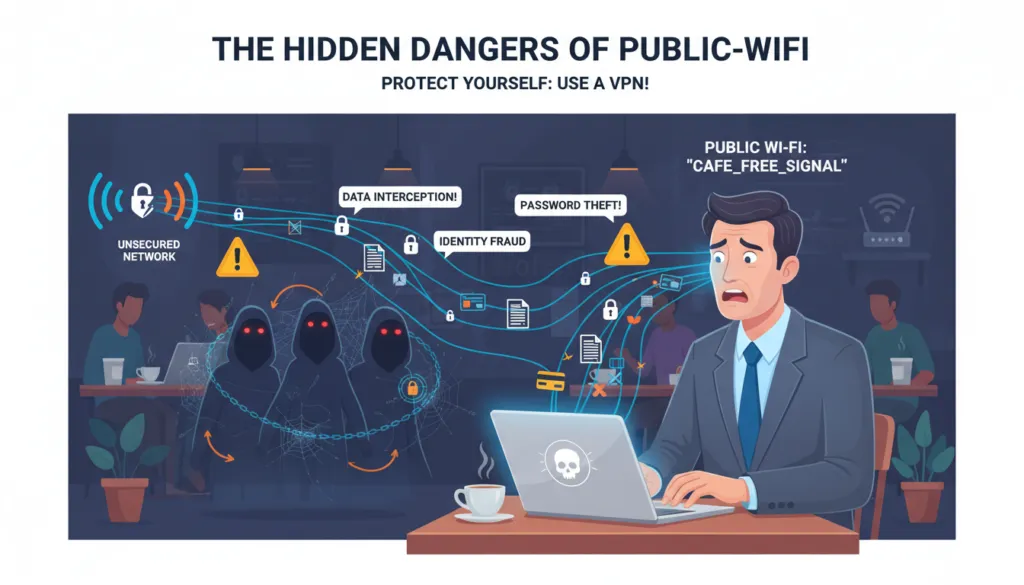
These hidden dangers—interception, impersonation, and sniffing—form the core threat model of public Wi-Fi. They work because the network itself lacks security. In the next section, I’ll show exactly how this exposed data becomes a tool for further attacks against you.
How Your Personal Information Becomes Public Property
Understanding attacks is one thing, but seeing their personal impact is another. The dangers of public Wi-Fi become real when you see what’s at risk. This turns a vague threat into a real, personal danger.
Unencrypted Data: Your Digital Life in Plain Text
Connecting to an unsecured network without protection makes your data very vulnerable. It’s like sending a postcard instead of a sealed box. Anyone with the right tools can read it as it passes by.
What Hackers Actually See
Without security, a hacker can see a shockingly clear picture of your online life. They can see the websites you visit, articles you read, and search terms. If you’re not using HTTPS, they can see the data you submit to forms before it’s encrypted.
The Most Vulnerable Types of Data
Not all data is the same to hackers. The most sought-after information includes:
- Login Credentials: Usernames and passwords for email, social media, and banking sites are the ultimate prize.
- Financial Information: Credit card numbers, bank details, or payment information entered on a non-HTTPS page.
- Personal Communications: The content of emails, private messages, and even unencrypted chat messages can be intercepted.
- Browsing History & Habits: Your digital footprint reveals your interests, location history, and daily habits.
This is the core of thesecurity threats on public wifi. It turns browsing into a data leak.
Session Hijacking: When Your Login Goes Wrong
Even if your password is safe, your active session might not be. Session hijacking is a sophisticated attack where a thief steals the “key” that keeps you logged into a website, like your email or social media account.
How Attackers Take Over Your Accounts
When you log into a website, the server gives your browser a “session cookie” or token. On an unsecured network, an attacker can use a packet sniffer to intercept this unique token. Once they have it, they can impersonate your browser, effectively becoming you on that site. They don’t need your password; they already have the keys to the door.
Real-World Examples of Account Takeovers
This isn’t just theory. Account takeovers from security threats on public wifi happen regularly. For instance, a business traveler using hotel Wi-Fi to check a corporate email account could have their session hijacked. The attacker, now logged in as the user, can read sensitive emails, access cloud storage, or even launch further attacks from the compromised account. Another common scenario involves social media accounts being hijacked on airport or café Wi-Fi, used to spread spam or scam the victim’s contacts.
In short, on an open network, your data isn’t just at risk of being seen—it can be stolen and used. Your email, your social media, and even your identity can be hijacked because a single, unencrypted session was left exposed. This is the real-world impact of the security threats on public wifi, turning a convenience into a critical vulnerability.
How V2Nodes Creates Your Personal Digital Fortress
We’ll see how V2Nodes builds a safe space for you online. It starts with knowing the dangers and ends with a secure place for all your web activities.
The Encryption Shield: Military-Grade Protection
V2Nodes uses top-notch encryption to keep you safe. This tech turns your data into unreadable code as it goes out. It’s like a strong digital lock on your info.
Even if hackers try to grab your data, they’ll only get jumbled text. This is your first line of defense against online threats.
V2Nodes employs AES-256 encryption, a favorite among security pros. The “256” means the encryption key is super long and hard to crack. So, every message you send is wrapped in a strong digital shield.
This makes your data a complex code that’s nearly impossible to break. It keeps your sensitive info safe from prying eyes.
How Your Data Stays Private End-to-End
End-to-end encryption is the top choice for keeping data private. With V2Nodes, your data is encrypted before it leaves your device. It travels safely through public Wi-Fi, only to be unlocked at the V2Nodes server.
This way, your data is never readable on public networks. Even your ISP can’t see what you’re doing online. It’s a big step towards safe browsing on public Wi-Fi.
The Secure Tunnel: Your Data’s Armored Car
Encryption is like the lock, but the secure tunnel is the vehicle that carries your data. When you connect to V2Nodes, it creates a private tunnel between you and a V2Nodes server. All your internet traffic goes through this safe path, hidden from others on the public Wi-Fi.
From Your Device to V2Nodes Servers
Here’s how it works: When you want to visit a website, your request is encrypted and sent through the tunnel. The V2Nodes server then makes the request to the internet for you. The website sees the request coming from the V2Nodes server, not your device.
This not only encrypts your data but also hides your true IP address and location.
Why This Tunnel Is Hack-Proof
The tunnel by V2Nodes is wrapped in layers of security. It uses strong protocols like OpenVPN and WireGuard®. These are designed to stop eavesdropping and man-in-the-middle attacks.
Even if you’re on a fake hotspot, your data stays safe inside the encrypted tunnel. It’s hidden from hackers and snoopers on the same network.
V2Nodes Features That Make You Invisible Online
Security on public Wi-Fi isn’t just about building walls. It’s about becoming a ghost. When you connect through V2Nodes, you’re not just shielded; you actively disappear from the view of snoops and hackers. This invisibility is powered by a suite of specific, high-performance features. Each one works in concert to achieve a single goal: protecting your data on public wifi by making your online presence untraceable and secure.
Military-Grade Encryption Explained
Think of encryption as a complex, unbreakable code. V2Nodes uses AES-256 encryption, the same standard trusted by governments and security agencies worldwide. It scrambles every single bit of data leaving your device into a meaningless jumble of characters. To anyone intercepting it on a public network, it looks like digital noise. This is the fundamental layer that turns your sensitive information into a secret language only your device and the secure server can understand.
AES-256 vs. Other Encryption Standards
Not all encryption is created equal. The strength of an encryption cipher is often measured by its key size—the number of possible combinations a hacker would need to try to break it. AES-256 stands at the top of this hierarchy.
| Encryption Standard | Key Size (Bits) | Primary Use & Security Level | Vulnerability to Brute Force |
|---|---|---|---|
| AES-256 | 256 | Military, government, top-tier financial data. Considered quantum-resistant. | Virtually impossible with current technology. Would take billions of years. |
| AES-128 | 128 | Common for general commercial security and online banking. Very strong. | Extremely difficult, but theoretically less future-proof than 256-bit. |
| Blowfish | 32-448 | Older systems, some legacy software. Largely deprecated for new systems. | Known vulnerabilities make it unsuitable for modern high-security needs. |
| DES (Data Encryption Standard) | 56 | Historical standard. Completely obsolete and easily broken. | Can be broken in minutes with modern computing power. |
Why This Level of Security Matters
You might wonder if such strong encryption is overkill for checking email at a café. It’s not. Cybercriminals use automated tools that constantly scan public networks for any weakness. A lesser encryption standard is a weaker link they can exploit. By employing AES-256, V2Nodes ensures there is no weak link. This eliminates the risk of your login credentials, personal messages, or banking details being deciphered, which is the core of protecting your data on public wifi.
The Kill Switch: Your Safety Net
Encryption is your armor, but what if the armor momentarily fails? A Kill Switch is your critical safety net. It continuously monitors the secure connection between your device and the V2Nodes server. If that connection drops unexpectedly—even for a split second—the Kill Switch instantly blocks all internet traffic to and from your device.
How It Protects You From Exposure
Without a Kill Switch, a dropped VPN connection would cause your device to revert to its normal, unprotected internet connection. On public Wi-Fi, this means your real IP address and unencrypted data would be exposed. The Kill Switch prevents this by acting as a circuit breaker. It stops all data flow until the secure VPN tunnel is fully re-established. This guarantees that your identity and activity are never accidentally leaked onto the insecure network.
Real-Time Protection Features
The V2Nodes Kill Switch operates in real-time, offering proactive protection:
- Instant Reaction: The block happens faster than any app or website can send identifying data.
- Application-Level Control: You can choose to block all traffic or only specific, sensitive applications.
- Persistent Security: It remains active in the background, ensuring safety even if you forget to manually reconnect.
This feature is non-negotiable for true security. It turns a potential moment of vulnerability into a managed safety event, solidifying the process of protecting your data on public wifi.
Global Server Network Advantage
Security isn’t just about technology; it’s also about strategy. V2Nodes operates a vast network of servers spread across numerous countries. This geographic diversity is a powerful tool for enhancing your privacy and connection stability.
Why Server Location Matters for Security
Connecting to a server in a different country or region does more than just allow access to geo-restricted content. It strategically distances your online activity from your physical location. If you’re in New York on a public Wi-Fi, but your connection exits through a server in Amsterdam, any tracker or eavesdropper will see the Amsterdam server’s location. This severs the direct link between your identity on the public network and your actual browsing activity, adding a crucial layer of obfuscation.
How Multiple Servers Increase Your Protection
A large server network provides two key security benefits:
- Load Distribution and Speed: Traffic is spread across many servers, preventing any single one from becoming a bottleneck. This maintains fast encryption speeds, so you don’t disable your VPN out of frustration—a common security mistake.
- Redundancy and Reliability: If one server experiences issues, you can instantly switch to another without interrupting your secure session. This resilience means your protected tunnel is always available, keeping you invisible.
By combining military-grade encryption, a failsafe Kill Switch, and a strategic global network, V2Nodes doesn’t just defend you. It redefines your relationship with public Wi-Fi, transforming you from a visible target into a ghost in the machine, fully focused on protecting your data on public wifi.
Step-by-Step: Your Complete Public Wi-Fi Safety Protocol
This guide turns awareness into action, giving you control over your digital safety. We’ve discussed the dangers of unsecured public wifi and how V2Nodes protects you. Now, let’s build your personal defense system. Follow these steps to secure every connection.
Each step is simple and designed for beginners. You don’t need technical expertise to stay safe. I’ll guide you from choosing your plan to testing your setup. Your security becomes automatic with this protocol.
Getting Started with V2Nodes: A Beginner’s Guide
Starting with V2Nodes takes just minutes. The process is streamlined for immediate protection. I remember my first setup – it was surprisingly straightforward. Let me show you how easy it can be.
Choosing the Right V2Nodes Plan
V2Nodes offers three main plans to match different needs. Your choice depends on how often you use public networks.
- Basic Plan: Perfect for occasional travelers who need protection at cafes and airports.
- Plus Plan: Ideal for regular business travelers with multiple devices.
- Pro Plan: Best for digital nomads and remote workers always on public Wi-Fi.
I recommend the Plus Plan for most users. It balances cost with comprehensive features. The Pro Plan adds advanced security layers for high-risk situations. Choose based on your exposure to public networks.
Installation and Setup Made Simple
Once you select your plan, installation follows these clear steps:
- Download the V2Nodes app from your device’s official app store
- Create your account using a strong, unique password
- Select your preferred payment method for subscription
- Launch the app and log in with your credentials
- Allow necessary permissions for the VPN to function properly
The interface guides you through each stage. I completed my setup in under five minutes. The app remembers your preferences for future connections. You’re now ready to configure optimal protection.
Optimal Settings for Maximum Protection
Default settings provide good security, but optimized settings deliver maximum protection. These adjustments ensure you’re always protected against evolving threats. I’ve tested these configurations across various networks.
Configuring for Different Network Types
Different public networks require specific security approaches. Your V2Nodes app can adapt to each environment.
For open coffee shop networks, enable these settings:
- Always-on VPN connection
- Kill Switch activated
- Highest encryption level selected
- Automatic server selection based on speed
For airport and hotel networks, add these configurations:
- DNS leak protection enabled
- WebRTC blocking turned on
- Split tunneling disabled for full protection
- Protocol set to WireGuard for best performance
These settings create layers of defense. Each network type presents unique dangers of unsecured public wifi. Your configuration should match the threat level.
Testing Your Security Setup
Never assume your protection is working. Regular testing confirms your security measures are active. I test my setup every time I connect to a new network.
Follow this testing protocol:
- Connect to the public Wi-Fi network first
- Activate your V2Nodes connection
- Visit a DNS leak test website (like dnsleaktest.com)
- Verify your IP address shows the VPN server location
- Check that no DNS requests show your actual ISP
- Confirm the kill switch works by briefly disabling VPN
This testing takes two minutes but provides peace of mind. You’ll know exactly when you’re protected. The process becomes routine with practice.
Your complete safety protocol is now established. From plan selection to configuration testing, you have control. This system works automatically once set up correctly. You can connect to any public network with confidence.
Beyond Coffee Shops: Other Wi-Fi Danger Zones
Cafes are not the only places with big wifi hotspot security risks. Hotels and airports are also risky, even though we trust them. Public transport is another danger zone. Knowing these places is key to staying safe.
Hotels and Airports: The Risk Multipliers
These places attract many valuable targets. Business travelers and tourists with credit cards are common. The many devices make it easy for hackers to hide.
Why Hotel Wi-Fi Is Particularly Dangerous
Hotel networks are complex, managed by third parties. The login you see might not be real. I’ve seen setups where guests could see each other’s files.
One password for the whole hotel means everyone is at risk if it’s hacked. Hotels don’t update their networks as often as companies do. This leaves them open to attacks.
Airport Wi-Fi: A Hacker’s Playground
Airports are full of people in a rush. They’re easy targets for hackers. Fake SSIDs look just like real ones, making it hard to tell the difference.
These areas are open to physical and digital snooping. Connecting to an unsecured hotspot means your data is exposed to anyone with bad intentions.
Public Transportation Networks
Wi-Fi on trains and buses is common. But, it comes with wifi hotspot security risks. The network can drop security when it changes towers.
Trains, Buses, and Their Hidden Dangers
Trains have one big hotspot for everyone. If it’s not secure, hackers can see all your data. These systems focus on coverage, not security.
How to Stay Safe While Traveling
Travel safety starts with being proactive. Never think a network is safe just because it’s from a known company. Use a VPN like V2Nodes to encrypt your data.
Here’s what I do in danger zones:
- Always use a VPN before connecting. Turn on V2Nodes *before* joining any Wi-Fi.
- Verify the official network name. Check with staff for the exact SSID at hotels and airports. Avoid similar but wrong names.
- Disable file sharing. Turn off public folder sharing to avoid sharing on a shared network.
- Use your mobile hotspot as a backup. For sensitive tasks, your cellular data is safer than public Wi-Fi.
By knowing these wifi hotspot security risks, you can stay safe everywhere. The threats grow with your travels, so does your need for protection.
V2Nodes in Action: Real-World Protection Scenarios
In the world of business and remote work, a single bad connection can ruin months of work. Public Wi-Fi has long been a risk for professionals on the move. But what does real protection look like? The following case studies show V2Nodes as a key shield for professionals everywhere.
Case Study: The Business Traveler
Imagine a sales director, Sarah, using airport lounge Wi-Fi before a big meeting. Her laptop has sensitive merger details. This is common for business travelers working from airports, hotels, and conference centers.
Protecting Corporate Data on the Go
Sarah needs to stay connected. Before V2Nodes, public logins were risky. Corporate firewalls and email filters don’t work outside the office. Her device, full of sales data, is a target on public Wi-Fi.
With V2Nodes, her situation changes. Its military-grade encryption protects her data like a personal detail. It creates a secure tunnel for her data. Even if the network is compromised, her emails and financial data stay private. It’s not just a VPN; it’s a mobile vault for her company’s secrets.
How V2Nodes Prevented a Major Breach
A colleague at a tech conference last year connected to what seemed like the hotel’s Wi-Fi. It was an “evil twin” network set up by a competitor. His device connected, and his login credentials were exposed for a few seconds.
“Without my V2Nodes connection, I would have handed over the keys to our entire development roadmap. The secure tunnel prevented any data from leaving my device without encryption, making the intercepted data useless to the attacker.”
V2Nodes didn’t just encrypt data; its Kill Switch feature cut off the internet if the secure tunnel was broken. This stopped any data leaks. This is the difference between a scare and a major breach.
Case Study: The Remote Worker
The rise of remote work has changed security. The office is now anywhere with Wi-Fi, and so are threats.
Secure Coffee Shop Working
Take Alex, a freelance graphic designer. His office is a local café. He handles client logos and designs. Public Wi-Fi is a risk for data capture.
When Alex connects to the café’s Wi-Fi, his data is visible. But with V2Nodes, his data is encrypted. The café’s network sees only scrambled data. His client’s designs stay confidential, even if the network is compromised.
Client Data Protection in Public Spaces
For professionals like Alex, client trust is key. A data leak can harm their reputation. When Alex sends or receives data, it’s vulnerable on public Wi-Fi.
V2Nodes protects client data:
- End-to-End Encryption: Data is scrambled before leaving Alex’s device, unreadable to interceptors.
- Secure DNS: V2Nodes routes internet requests through secure DNS servers, preventing fake login pages.
- Network Lock (Kill Switch): If the secure connection drops, the Kill Switch blocks all internet traffic, preventing leaks.
This isn’t just about hiding browsing history. It’s about sending final files, sharing financial models, or sending manuscripts. V2Nodes keeps confidential work safe. In the remote work era, your security is your device. V2Nodes keeps it secure.
Debunking Public Wi-Fi Security Myths
It’s time to debunk common myths about public Wi-Fi security. Many people rely on outdated or wrong information, leading to data breaches. Let’s tackle three myths that risk your personal and financial info every time you connect.
Users often believe false security myths. This is like leaving your door unlocked in a busy area. Let’s reveal the truth behind these misconceptions.
Myth 1: “I Only Check Email, So I’m Safe”
This myth is dangerous. Many think checking email or social media makes them safe. But, this is not true.
Why Email Is More Vulnerable Than You Think
Your email is a key to your digital world. Hackers can get your login details when you check email on public Wi-Fi. They can then access your bank and social media accounts.
Think about what’s in your email. Bank statements, login confirmations, and sensitive info are all at risk on unsecured networks.
“The most secure password is useless if it’s sent over an unsecured network.”
Myth 2: “Secure Websites (HTTPS) Are Enough”
Trusting only the padlock icon is a half-truth. HTTPS encrypts data with a website, but not your whole connection.
The Danger of Mixed Content and HTTP Pages
Many sites have mixed content, with some parts loaded over HTTP. This lets attackers inject malware or track you. Your ISP can also see which sites you visit, even on HTTPS sites.
A VPN like V2Nodes encrypts all your traffic. This secures your connections, including DNS requests, and keeps your browsing habits private.
Myth 3: “My Phone Handles Security Automatically”
We trust our phones too much. Auto-connect features are a major security risk, not a benefit.
The Risks of Automatic Wi-Fi Connections
Your device might auto-connect to networks, including fake ones. Attackers can set up fake hotspots. A VPN with an automatic kill switch, like V2Nodes, is key to prevent data leaks.
To understand these myths, let’s look at common misconceptions versus reality:
| Common Myth | Reality Check |
|---|---|
| “I have nothing to hide, so I’m not a target.” | Hackers use automated bots that don’t discriminate. They target all devices on a network, looking for any vulnerability. |
| “The coffee shop’s Wi-Fi is password-protected, so it’s safe.” | A password on a public Wi-Fi network only restricts who can join the network, not who can see the data traveling across it. The traffic is often still unencrypted. |
| “My device’s firewall and antivirus will protect me.” | Firewalls and antivirus software are crucial, but they don’t encrypt your internet traffic. They can’t stop a man-in-the-middle attack on an unsecured network. |
Believing these myths can lead to security breaches. The solution isn’t to avoid public Wi-Fi. Instead, use it wisely with a reliable VPN.
V2Nodes creates a secure tunnel around your data. This makes myths irrelevant. You can browse, bank, and communicate safely, knowing your data is protected.
Conclusion: Your Action Plan for Wi-Fi Security
We’ve seen the dangers of public Wi-Fi. From hackers to fake hotspots, your data is at risk. Knowing the risks is just the start. Taking action is what keeps you safe.
V2Nodes is your shield against these threats. It creates a secure tunnel for your data. With top-notch encryption and servers worldwide, you’re protected.
Here’s what you need to do. Always use V2Nodes when you’re on public Wi-Fi. Keep it running on all your devices for ongoing safety. And don’t forget to use strong, unique passwords. Remember, security is an ongoing effort.
Public Wi-Fi dangers are real, but you’re ready. Protect your online world now. Visit V2Nodes to secure your connection.